free self-hosted

One desk. Every platform.

Agents on your Windows, macOS and Linux machines; iOS and Android remoted in from their simulators. One app to watch them all — and to step in the moment one needs you. Visual Git, file editing and Markdown preview included.

  1. write on your desk
  2. mirror remote screens on your client
  3. compare side by side
  4. fix in the attached terminal
  5. commit visual git, one click

Everything around the terminal, already built in.

Start with every machine you own, then stay in flow: organize terminals, keep sessions alive, work files, turn screenshots into input, speak instead of typing, work with Git, translate what you read, supervise agents, drive embedded boards over UART, and extend the server when you need more.

01 · every machine

Every screen. One desk.

Watch and control desktops, terminals, iOS simulators and Android devices from one native app. Focus a pane and you are working on that machine — no extra keyboards, remote tools or window hopping.

  • Windows · macOS · Linux
  • iOS Simulator
  • Android emulator + adb
  • 60fps desktop streams
Remote desktop docs

02 · terminal layout

Terminals that fit your workflow.

Split a tab into panes, group tabs by machine, drag a tab into its own window, and let the server watch for ordinary confirmations or finished tasks while you keep moving.

  • splits + tab groups
  • drag tabs into windows
  • Auto Confirm
  • completion notifications
Terminal docs

03 · sessions

Sessions that never die.

Kill the client, lose the network, close the lid. The session lives on the server — every screen, every emulator, every agent keeps running — and vtermc -s reattaches from any machine.

deb · rpm · tar.gzx64x86arm64armriscv64
Reattached
client · your laptopconnected
Mac Miniagent · build
$ vibe run "all platforms"
windows 12/12 ✓
macos 12/12 ✓
linux 14/14 ✓
✓ all platforms green — 38 passed
✓ session restored — nothing was lost
session restored · #7f3a
server · build-boxsession alive
build-box3 sessions alive
session #7f3a · zshuptime 02:47:19
$ vibe run "all platforms"
windows 12/12 ✓
macos 12/12 ✓
linux 14/14 ✓
✓ all platforms green — 38 passed
running independently of the client
  1. 1Connected
  2. 2Client closed
  3. 3Server continues
  4. 4Reattached

04 · workbench

Files and Git beside the terminal.

Every tab keeps its own working directory, Explorer and Git context. Filter files by name, search a whole directory, edit in place, then commit without leaving the terminal.

  • per-tab cwd + Explorer
  • quick filename filter
  • recursive content search
  • editor + Markdown preview
File explorer docs

05 · screenshots + images

Show the terminal what you see.

Capture any region with a global hotkey, annotate it, then paste the image straight into a terminal. The image is uploaded to the session server and inserted as a quoted path that shells, editors and code agents can open.

  • Shift + Alt + A capture
  • rectangles + ellipses
  • copy or save PNG
  • paste as a server-side path
Screenshots & images docs

06 · voice

Speak. It types.

A pure-Rust local ASR server turns dictation into terminal input. Pick a Qwen3-ASR, Fun-ASR or Parakeet-TDT model, run it on CPU, CUDA, Vulkan or Metal, and keep audio and text on your machine.

  • Qwen3-ASR · Fun-ASR · Parakeet-TDT
  • CPU · CUDA · Vulkan · Metal
  • full / 8-bit / 4-bit models
  • audio + text stay local
Voice docs

07 · git

Git without command-line acrobatics.

Stage, discard, stash, branch and create worktrees visually. Generate a commit message from the staged diff, reorder a rebase queue, and resolve conflicts hunk by hunk — with AI help when you want it.

  • AI commit messages
  • stage · discard · stash
  • branches + worktrees
  • visual rebase + conflicts
Git docs

08 · translation

Read code in your language.

Translate commit text, diffs, agent history and code comments where you read them. Translation is its own AI feature, so it can use the provider and target language that fit the job.

  • commits + diffs
  • agent history
  • code comments
  • per-feature provider
AI configuration docs

09 · agents

Agents you can actually supervise.

Run agents in real terminals on each machine, review their native conversation history in a structured panel, and use MCP tools to read screens, send input and wait for completion.

  • claude · codex · kimi · pi · opencode · deepseek
  • native history files
  • MCP tools
  • reply from the panel
Agent history docs

10 · embedded + uart

Your agent, down to the bare metal.

Turn a board's UART console into a terminal your agent can operate. Diagnose boot failures, run on-device diagnostics, configure Wi-Fi and verify the result on real hardware — without pasting serial logs into a chat or juggling a separate serial monitor.

  • boot failure diagnosis
  • on-device diagnostics
  • Wi-Fi + network setup
  • UART + MCP feedback loop
UART docs

11 · addons

Extend it with JavaScript.

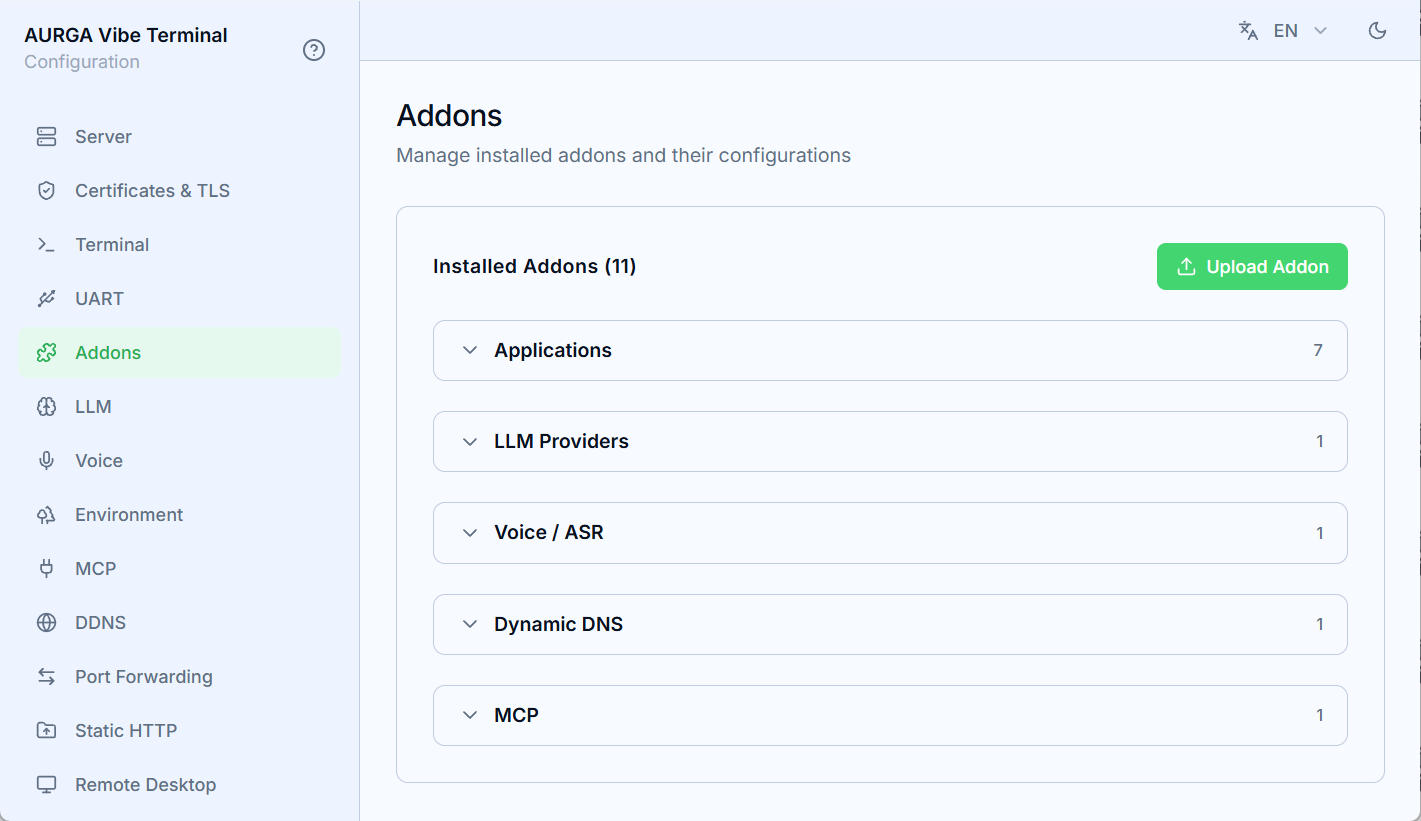
Teach the server new agent apps, LLM providers, ASR backends, DDNS services and MCP tools without changing the core. Upload a small manifest and JavaScript file, or hot-patch a built-in addon.

  • Applications
  • LLM providers
  • Voice / ASR
  • Dynamic DNS + MCP
Addon docs
The Addons settings page grouped by Applications, LLM, ASR, DDNS and MCP

Self-hosted. Direct or relayed. Always encrypted.

Each host runs your own vterm-server. Connect directly over your LAN or a DDNS domain, or let one server act as a relay so hosts behind NAT can join over outbound WSS. Terminal and request payloads stay encrypted between client and host, while screen media uses separate encrypted UDP streams. Cloudflare DDNS is built in, and addons let you integrate other DNS providers.

WSS + Noise control + voice encrypted UDP via relay direct CLIENT vterm native desktop client terminal + tools files · Git · agents screen + input display · decoder RELAY SERVER vterm-server local server + relay role control + relay sessions · routing · sealed payloads UDP pairing vterm-voice via vterm-server · local ASR vterm-screen-server auth via control · encrypted UDP SHARED HOST vterm-server one shared host · every machine shared control terminal · files · Git UART · MCP vterm-voice via vterm-server · local ASR vterm-screen-server auth via control · encrypted UDP control · auth control · auth

Free to download. On every platform.

Bring your own desk.

Download for free

Questions? The full FAQ lives in the docs →