Documentation
Overview
File management lets you work with files on the server directly from the client: the left activity bar has two entries — Recent (recent projects) and the file explorer — used alongside terminal tabs. Everything operates on the session’s server: the local machine, or a remote/shared machine over a relay.
Recent: recent projects
Recent lists the folders your code agents opened most recently on the current server, newest first:
- Click an entry and the file explorer switches to that directory;
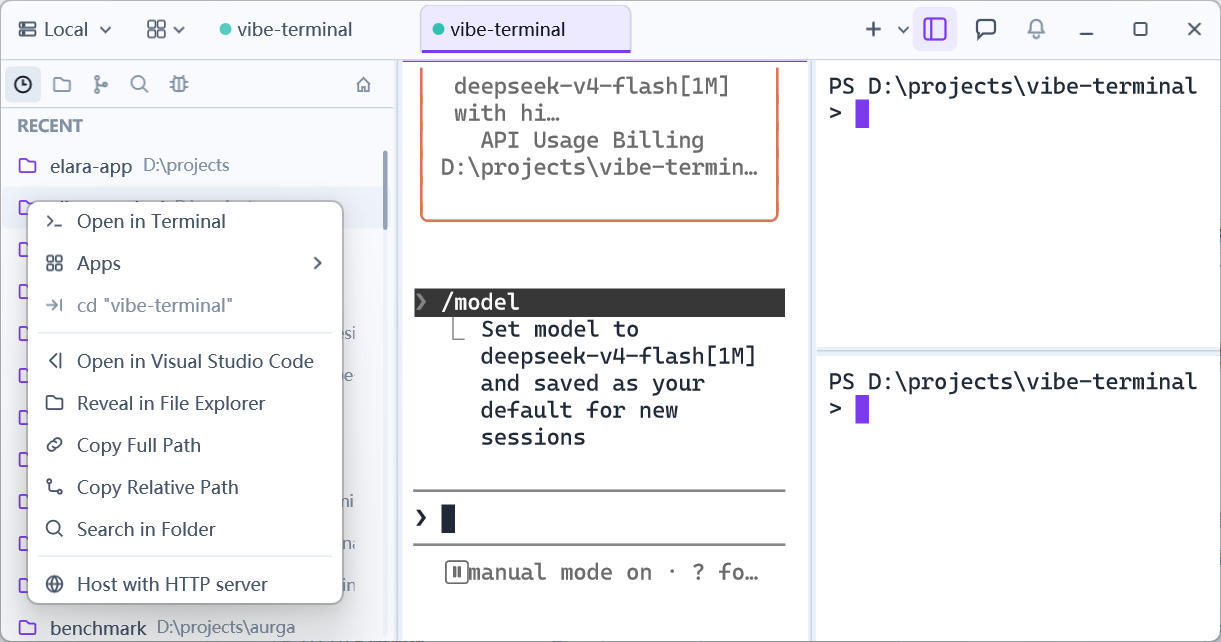
- Right-click opens a menu of quick actions:
Open in VS Code— open the directory in VS Code on this machine;Reveal in File Explorer— show it in the OS file manager;Copy Full Path/Copy Relative Path— full path, or path relative to the repository;Search in Folder— search files inside that directory;Open in Terminal— open a new terminal tab there;cd Here— cd the current terminal to it;Host with HTTP server— publish the directory as an HTTP file service (see Host with HTTP Server);Open in App— open it with an agent app detected on the server.
The file explorer
The Explorer tab browses and manages the server-side file system: directory navigation, tree and flat views, search, create/rename/delete and other file operations, plus drag-and-drop upload and download between the server and this machine. See File Explorer and Upload & Download.