Documentation
Overview
The relay solves one problem: most machines sit behind NAT or dynamic IPs, so clients cannot dial each of them directly. Let one publicly reachable machine act as the relay entry point; every other machine dials out to it. A client then maintains a single connection to the relay and reaches every shared server’s terminals through it.
Architecture
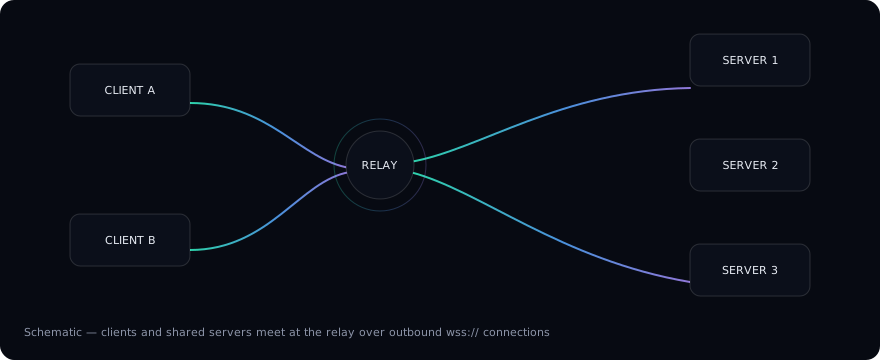
- Relay server — the public entry point that clients and shared servers connect to. Leave its
Relay Addressempty. - Shared server — a machine whose
Relay Addresspoints at the relay. It dials upstream and shares its terminals through it. The colored stripe on each shared node in the diagram mirrors the stripe the desktop client paints on that server’s tabs — one color per server. - Connections always originate from inside: shared servers dial the relay, so no port forwarding or public IP is needed on them.
What the client sees
Once connected to the relay, every shared server behaves like a local machine:
- Terminal tabs carry a colored stripe and the remote OS icon, identifying the machine at a glance (see the Setup Guide);
- The profile menu groups terminals per server — open a terminal on any machine directly;
- Tab groups can be torn off into their own window, dedicating a window to one machine.
Security model
Clients and shared servers pair with the same secret key; connections are tunneled through the relay. The key travels in the pairing QR code / share string, never in plain text.
Step-by-step instructions are on the next page, Setup Guide.